Tell Gemini Omni Flash what changes, then spend just as many words on what stays the same.
How to use Gemini Omni Flash on Nsketch: edit a clip up to 30 seconds or build one from 7 reference images, at up to 4K, with prompts and credit costs.
What Gemini Omni Flash Is Good At
Gemini Omni Flash is Google's model for directed changes to video. Give it a clip and describe what should be different: snow on a summer street, a red thermos in place of a coffee cup, a new outfit on the same person. It can also build a new clip from up to 7 reference images of people, products and places.
It can also render in 4K. Output runs at 720p, 1080p or 2160p, so a product shot or a background plate can hold up on a large screen.
Two limits shape every job. Clips are 4, 6, 8 or 10 seconds, and the Nsketch integration makes silent video. If the final cut needs sound, plan to add it in the edit. The Gemini Omni Flash model page lists the full specs, and the model needs a paid plan.
Gemini Omni Flash Settings on Nsketch
There are two ways in. In edit mode you upload one source video of up to 30 seconds, and the result comes back at up to 10 seconds. In generate mode you write a prompt and can add reference images. Version 1.1 sits in the same picker with the same inputs and prices.
| Setting | Options on Nsketch |
|---|---|
| Length | 4, 6, 8 or 10 seconds |
| Resolution | 720p, 1080p or 4K (2160p) |
| Aspect ratio | 16:9 or 9:16 |
| Reference images | Up to 7, each up to 20 MB |
| Source video | One clip up to 30 seconds and 100 MB; result up to 10 seconds |
| Audio | None |
How to Write Gemini Omni Flash Prompts
An edit prompt has two halves: the change and the locks. Name the change in concrete terms, then list everything that must stay as it was, such as the people, their movement, the camera move and the framing. A prompt that only describes the new look leaves the model free to alter things you wanted kept.
When you build from reference images, refer to each one by its position, like image 1 and image 2, and give each a role: the person, the product, the location. Then describe a single action and a single camera move.
Two patterns to start from. Edit: In the uploaded video, change [what] to [what]. Keep [people, motion, camera, framing] the same. Generate: [subject from image 1] + [action] in [place from image 2]. [Camera move]. [Light and look]. [Exclusions].
- Describe changes in visible terms: frost on the windows, not "a colder mood"
- Give a transformation a direction, such as from the base upward or left to right
- Leave sound out of the prompt; the Nsketch integration does not generate it
Worked Example: A Material Change on a Product
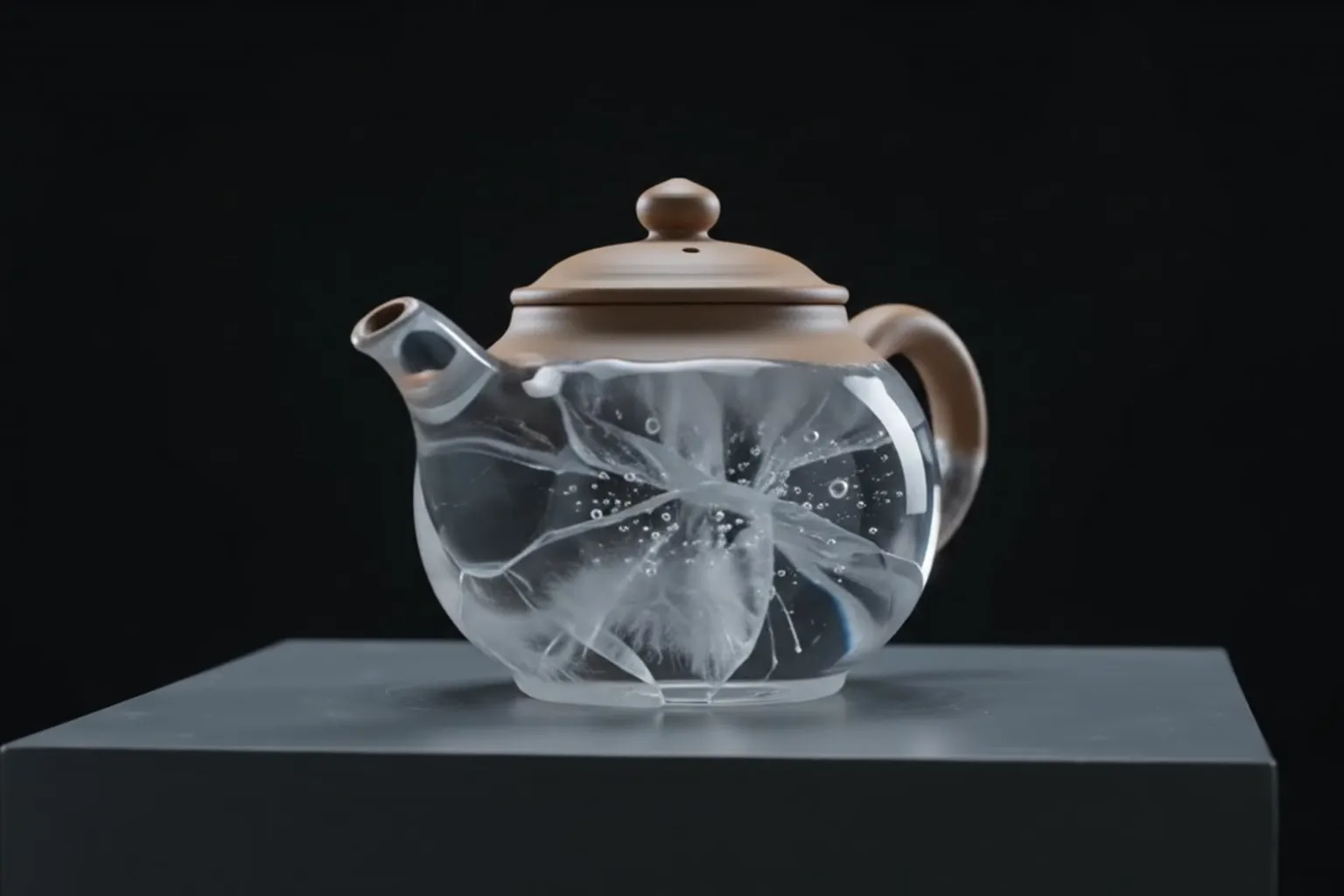
This prompt turns a ceramic teapot into sculpted ice. Most of its length goes to locks: the silhouette, handle, lid, spout and position all stay fixed, and so does the plinth. The change itself gets a direction, from the base upward, and three stages: matte clay, frosted crystal, then clear ice with bubbles and fractures.
The camera gets one move, a clockwise orbit from front three-quarter to side profile. The closing exclusions rule out hands, spills, extra objects and shape drift, which are the failures a product transformation is most likely to show.
Gemini Omni Flash · 6 seconds · 720p · generated in Nsketch
Prompt
On a charcoal-gray studio plinth, a hand-thrown ceramic teapot slowly transforms into transparent sculpted ice while preserving its exact silhouette, handle, lid, spout and position. The camera performs one precise clockwise product orbit from front three-quarter to side profile. The material transition travels from the base upward: matte clay becomes frosted crystal, then clears to reveal suspended bubbles and tiny fractures catching the light. Softbox reflections slide naturally across the changing surface. Minimal luxury product cinematography, deep black background, cool edge light, physically plausible refraction, razor-sharp object detail. Keep one teapot only and keep the plinth unchanged. No hands, no extra objects, no liquid spill, no shape drift, no cuts, no text, no logo, no watermark.
What Gemini Omni Flash Costs in Credits
Generating from a prompt or reference images is priced by length and by whether you render in 4K. 720p and 1080p cost the same, so render the version you keep at 1080p. The 6-second example above cost 75 credits; at 4K it would have cost 150.
Editing a video is a flat 150 credits, or 225 at 4K, whatever the length of the source clip.
| Length | 720p or 1080p | 4K |
|---|---|---|
| 4 seconds | 55 | 130 |
| 6 seconds | 75 | 150 |
| 8 seconds | 95 | 170 |
| 10 seconds | 110 | 185 |
| Video edit | 150 | 225 |
When to Pick a Different Nsketch Model
Pick Veo 3.1 when the clip needs spoken dialogue, sound effects or music. It makes 4, 6 or 8 second clips at 720p or 1080p with audio on or off.
Pick Kling 4.0 when the result has to run longer than 10 seconds or follow a reference video closely. It makes 3 to 30 second clips with generated audio.
Pick Seedance 2.5 when you need a long single take guided by images, clips and audio together. It runs 4 to 30 seconds and generates sound in the same pass as the picture.
FAQ
Frequently asked questions
No. The source can be up to 30 seconds, but the edited result is at most 10 seconds. Trim the source to the part you need before you upload it.
No, they cost the same. Only 4K raises the price: a 4-second clip goes from 55 to 130 credits.
Version 1.1 is the newer one. Both take the same inputs and cost the same on Nsketch, so you can run the same prompt on each and keep the better result.
Add it in your editor. The Nsketch integration makes silent clips, so if sound has to come from the model, use Veo 3.1, Kling 4.0 or Seedance 2.5 instead.
No. Editing is a flat 150 credits, or 225 at 4K, for any source up to 30 seconds.