Put the exact words in quotes, draft at Low for 3 credits, and save Max for the image you keep.
How to use GPT Image 2.5 on Nsketch: Sunburst or Flare, which quality tier to pay for, how to prompt text, and what edits cost.
What GPT Image 2.5 Is Good At
GPT Image 2.5 is OpenAI's image model on Nsketch, and it earns its place on two kinds of job: images with words in them, and edits where one detail changes and the rest of the photo has to stay put. Posters, labels, signs and title cards fall in the first group. Recoloring a car or swapping one object in a product shot falls in the second.
It can also export with a transparent background, which GPT Image 2 can't. Logos, stickers and product cutouts come out ready to drop onto a design without a separate background-removal step.
Its sizes run from square to 16:9. If you need a 21:9 banner, Nano Banana Pro covers ten aspect ratios from 21:9 to 9:16. The top tier also gets expensive at large sizes: a Max image at 3840×2160 costs 40 credits.
Settings and Limits on Nsketch
GPT Image 2.5 comes in two versions in the model picker. Sunburst is the most capable, Flare is the faster everyday one, and both cost the same, so pick by speed and quality, never by price. Every setting below applies to both versions, and the full spec list is on the model page at nsketch.ai/models/gpt-image-2-5.
| Setting | Options on Nsketch |
|---|---|
| Versions | Sunburst or Flare, same price |
| Quality | Low, Medium, High, Extra High, Max |
| Sizes | Presets from square to 16:9, including 2160×2160 and 3840×2160; Auto when images are attached |
| Background | Transparent available |
| Reference images | Up to 10 |
| Plan | Paid plan required |
How to Prompt GPT Image 2.5 for Text
Write every word you want in the image inside quotes, exactly as it should be spelled, and say where it goes. "SALT BAY" at the top tells the model the words, the position and, with "clean sans-serif", the lettering. A second line needs its own size and place, such as "Est. 1962" small at the bottom, or the model has to guess how the two lines relate.
Around the text, name the format first, then the scene, the style, the palette and the finish. For a sticker or logo, add "transparent background" to the prompt and set Background to Transparent before you generate.
- Pattern: [format] for [subject]: [main scene], [style], [palette], title "[exact words]" at [position], "[second line]" [size] at [position]. [Finish or texture].
- Keep each text line short so you can check the spelling at a glance
- Use Low quality while you test wording and layout, then rerun the prompt that works at High or Max
Editing With Reference Images
Attach up to 10 images and GPT Image 2.5 switches to editing on its own. It changes only what you describe, so the prompt should name the change and then list what must stay: "change only the color of the car to deep red. Keep everything else, including reflections and the background, unchanged."
With images attached you can set the size to Auto and the output takes its shape from your images. Each reference adds credits on top of the image price: 4 per image for square output and 6 for other sizes.
Worked Example: A Retro Travel Poster
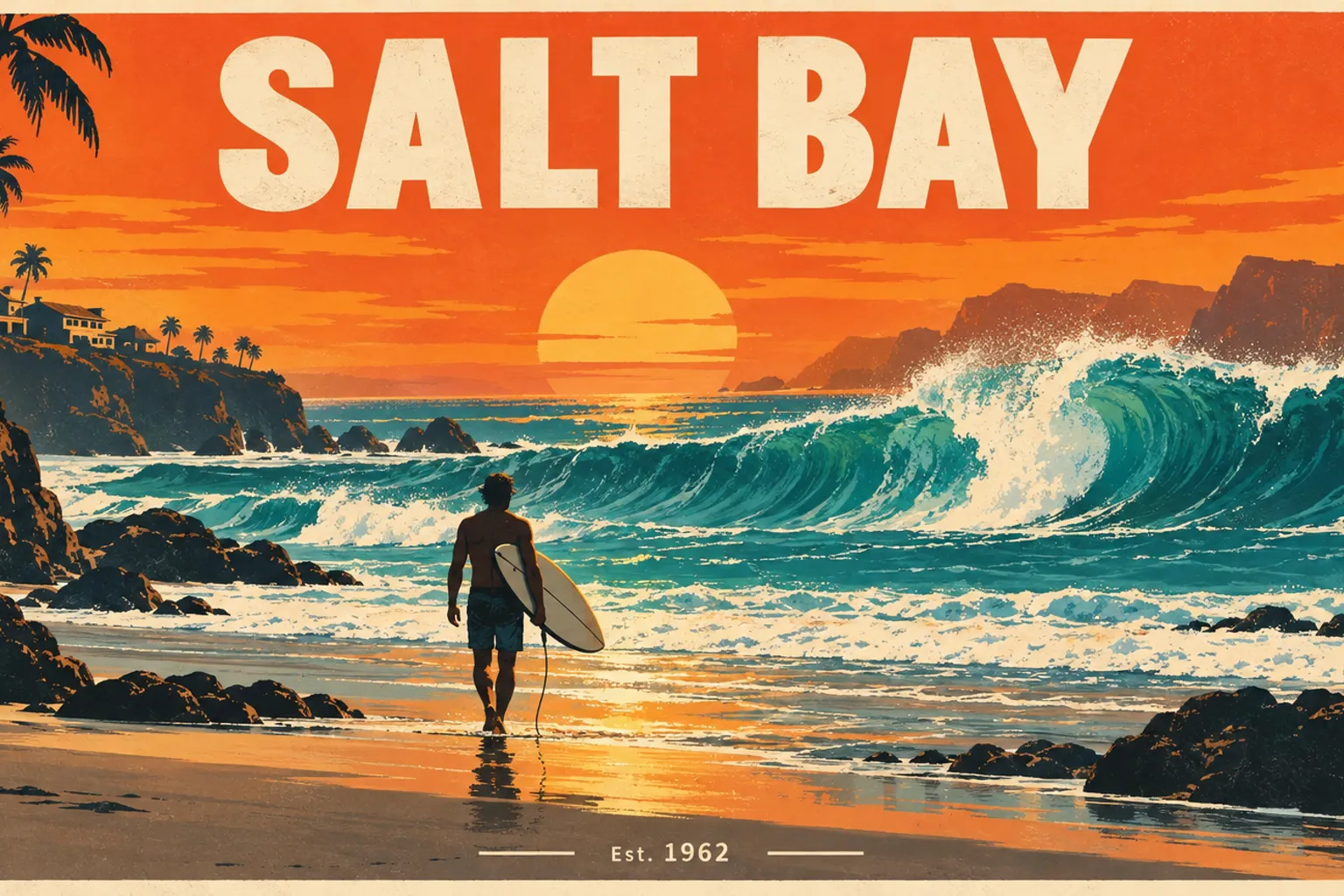
This prompt asks for two separate pieces of text at two different sizes. GPT Image 2.5 Sunburst rendered both lines correctly, "SALT BAY" as the title at the top and "Est. 1962" small at the bottom. Posters and labels with a line or two of exact text are what to use it for.
The rest of the prompt sets the format (retro travel poster), one subject with one action (a lone surfer walking toward the waves), the time of day, the style (flat graphic shapes), a two-color palette and a finish (crisp print texture). Swap the town name, the subject and the palette and the same structure works for event posters and labels.

GPT Image 2.5 · 1536×864 · High quality · Sunburst version
Prompt
A bold retro travel poster for a fictional surf town called "SALT BAY": a lone surfer walking toward huge turquoise waves at sunset, flat graphic shapes, warm orange and teal palette, clean sans-serif title "SALT BAY" at the top and "Est. 1962" small at the bottom. Crisp print texture.
What GPT Image 2.5 Costs
The price depends on quality and size. The default is Medium at a square size, which costs 4 credits. Low is 3 credits at every size, and Max at 4K is the ceiling at 40.
- Four Low drafts to test a poster's wording: 4 × 3 = 12 credits
- The winning prompt rerun at Max in 3840×2160: 40 credits, so 52 for the whole job
- An edit at High, default square size, with two reference photos: 6 + 2 × 4 = 14 credits
| Quality | Default square | 3840×2160 |
|---|---|---|
| Low | 3 credits | 3 credits |
| Medium | 4 credits | 4 credits |
| High | 6 credits | 11 credits |
| Extra High | 10 credits | 18 credits |
| Max | 22 credits | 40 credits |
When to Pick a Different Nsketch Model
GPT Image 2.5 is the default choice for text and scoped edits. These models fit other jobs better.
- Seedream 5 Pro: built for precise layouts and typography, such as a menu with a title, four items and prices in a grid; 10 credits at 1K and 20 at 2K
- Nano Banana Pro: ten aspect ratios from 21:9 to 9:16 and a flat 30 credits at 4K, for wide banners
- Flux 2 Max: photoreal portraits and interiors at 7 to 9 credits an image, with 1 to 4 images per run
- GPT Image 2: the earlier OpenAI model with Low, Medium and High only and no transparent backgrounds
FAQ
Frequently asked questions
Use Sunburst when the result matters most and Flare when you want images back faster. They cost the same number of credits, so price doesn't decide it.
Start at Low, which costs 3 credits at any size, to check wording and layout. Once the prompt works, rerun it at High or Max for the version you keep.
Set Background to Transparent before you generate and describe the subject as a sticker, logo or cutout. Write "transparent background" in the prompt as well.
Yes. Each attached image adds 4 credits when the output is square and 6 for other sizes, on top of the price for the quality and size you picked.
No. GPT Image 2.5 needs a paid Nsketch plan.