Draft on Lite at 4 credits an image, then finish on Pro at 2K for 20.
How to use ByteDance Seedream 5 on Nsketch: Pro or Lite, prompts for layouts and text, multi-image edits, and what each image costs.
What Seedream 5 Is Good At
Seedream 5 is ByteDance's image model, and on Nsketch it comes in two versions. Seedream 5 Pro is built for precise layouts and typography: café menus, sale posts with a big "30% OFF", posters where the words have to read right. Seedream 5 Lite costs a flat 4 credits an image and handles fast generating and editing.
Both versions edit with up to 10 reference images, which makes Seedream 5 a good fit for product collages: several product photos merged into one flat-lay with even spacing and one background.
It tops out lower than some other Nsketch models. Pro renders at 1K or 2K, and auto sizing with attached images reaches 2K on Pro and 3K on Lite. It has five aspect ratios: 1:1, 4:3, 3:4, 16:9 and 9:16. For 4K or a 21:9 banner, see the alternatives below.
Seedream 5 Pro vs Lite
Pick the version first, because it decides the price and the size ceiling. The model page at nsketch.ai/models/seedream-5 lists the same specs.
- Aspect ratios: 1:1, 4:3, 3:4, 16:9 or 9:16
- Both versions need a paid plan
| Seedream 5 Pro | Seedream 5 Lite | |
|---|---|---|
| Built for | Precise layouts and typography | Fast generating and editing |
| Price per image | 10 credits at 1K, 20 at 2K | 4 credits |
| Auto size with images attached | Up to 2K | Up to 3K |
| Reference images | Up to 10 | Up to 10 |
| Extra cost for references | 1 credit per reference after the first, per image | None |
How to Prompt Seedream 5
For a layout, describe it the way you would brief a designer. Name the format, quote every piece of text exactly, say how the items are arranged, then give the colors and the aspect ratio. "A clean café menu board with the title "Morning Menu" and four items with prices, cream background, green accents, neat grid layout, 3:4" covers all five.
For a photo, lead with the shot type and give the subject one color that stands apart from the background. Then name a real place, the time of day, what the light falls on, and the genre of photography.
- Layout pattern: [format] with [title in quotes] and [items], [background color], [accent color], [arrangement], [aspect ratio].
- Photo pattern: [shot type] of [subject with one standout color] in [named place] at [time of day], [what the light hits], [genre].
- Check every quoted word in the result before you publish it
Editing and Merging Reference Images
Attach up to 10 images and Seedream 5 edits them. For a collage, say how the products sit relative to each other and what goes under them: "Combine the attached product photos into one flat-lay on a pale pink background, evenly spaced, soft top light, 4:3."
On Pro, references after the first add 1 credit each to every image you generate. Lite charges its flat 4 credits whatever you attach, so it is the cheaper way to test a five-product layout before running it on Pro.
Worked Example: A Hiker Above the Clouds
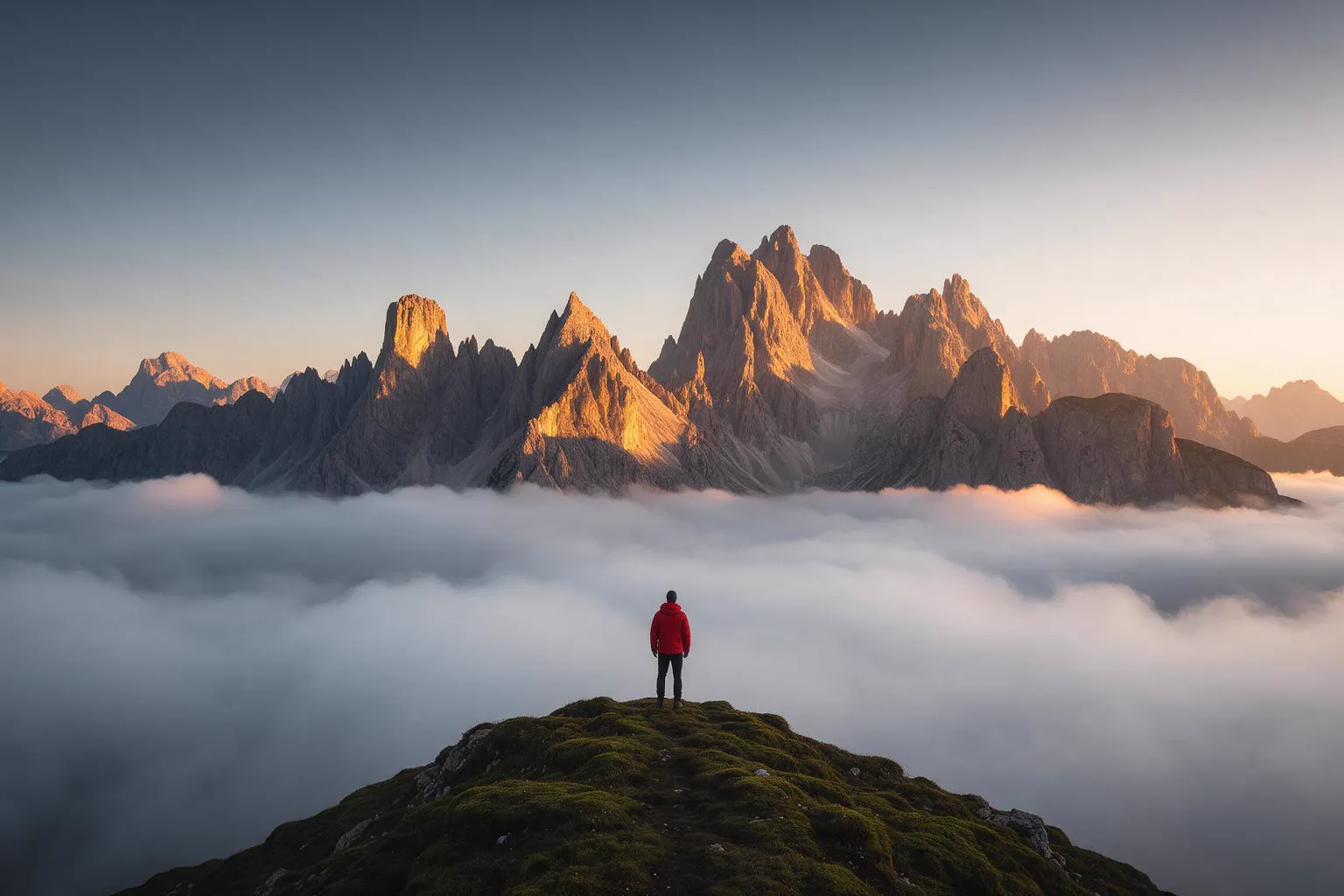
Seedream 5 Pro also takes straight photo prompts, and this one follows the photo pattern. It opens with the shot type (cinematic wide shot) and gives the single subject a bright red jacket, the one strong color against moss, cloud and rock.
The location is a named place, the Dolomites, and the light has a job: golden light on jagged peaks at sunrise. The prompt closes with the genre, ultra-detailed landscape photography.

Seedream 5 Pro · 16:9 · Seedream 5 Pro
Prompt
Cinematic wide shot of a lone hiker in a bright red jacket standing on a mossy ridge above a sea of clouds in the Dolomites at sunrise, golden light on jagged peaks, ultra-detailed landscape photography.
What Seedream 5 Costs
Pro is priced by resolution and, for edits, by how many references you attach. Lite is 4 credits an image with no extras. Here is one product collage job priced on each version: three reference photos, two images, at 2K on Pro.
- Pro at 2K: 20 credits per image, plus 1 credit for each of the two references after the first, so 2 × (20 + 2) = 44 credits
- Lite: 2 × 4 = 8 credits
- A text-only Pro image at 1K: 10 credits
When to Pick a Different Nsketch Model
Seedream 5 covers layouts, text and collages up to 2K. These models cover what it doesn't.
- Nano Banana Pro: 1K, 2K or 4K in ten aspect ratios from 21:9 to 9:16, at 15 credits (30 at 4K)
- GPT Image 2.5: transparent backgrounds for logos and stickers, and sizes up to 3840×2160
- Flux 2 Max: photoreal portraits at 7 to 9 credits an image
- Nano Banana 2 Lite: 4 credits for a 1K image, the same price as Seedream 5 Lite
FAQ
Frequently asked questions
Start with Lite when you are still testing wording or arrangement, since every image is 4 credits. Move to Pro when the layout and text are settled and you want the version built for precise typography.
Seedream 5 Pro is built for layouts and typography. Quote each line exactly in the prompt and check the spelling in the result before you use it.
Each reference image after the first adds 1 credit to every image generated. Three references on one 2K image cost 20 + 2 = 22 credits.
2K on Pro. With images attached, auto sizing goes up to 3K on Lite. For 4K, use Nano Banana Pro or GPT Image 2.5.
No. Both Pro and Lite need a paid Nsketch plan.