Draft with Mini or Fast at 480p, then spend Standard credits on the version you keep.
How to use Seedance 2.0 on Nsketch: when to pick Standard, Fast or Mini, named references, a prompt pattern, a worked example and credit costs.
What Seedance 2.0 Is Good At
Seedance 2.0 is ByteDance's video model in three versions on Nsketch. Standard gives the highest quality and renders at 720p, 1080p or 4K. Fast and Mini render at 480p or 720p for far fewer credits. All three make 4 to 15 second clips with sound.
It covers two jobs well: final renders that need 4K, and cheap drafts where you try an idea several times before paying for a full-quality run. It also takes named references, up to 9 images, 3 videos and 3 audio clips, which you call in the prompt as @Image1, @Video1 and @Audio1.
The ceiling is 15 seconds. A longer single take needs Seedance 2.5, which goes to 30.
Standard, Fast and Mini on Nsketch
The three versions share every other setting: 4 to 15 seconds in one-second steps; 16:9, 9:16, 1:1, 4:3, 3:4 or 21:9; and audio on or off at the same price. A run starts from text, a first frame, a first and last frame, or references.
Frames and references can't be mixed in one generation, and reference videos and audio clips are each capped at 15 seconds in total.
| Version | Resolution | Starts at | Who can use it |
|---|---|---|---|
| Standard | 720p, 1080p or 4K | 70 credits (4 s, 720p) | Web plans, Starter or higher; 4K needs Pro or Max |
| Fast | 480p or 720p | 30 credits (4 s, 480p) | Everyone |
| Mini | 480p or 720p | 28 credits (4 s, 480p) | Everyone |
How to Prompt Seedance 2.0
Name every reference by its tag and give it one job. "@Image1 walks into the café from @Image2" says who and where in one clause. A tag without a job leaves the model to work out why the file is there.
For text-only prompts, start with what is in frame at second zero, describe the change or action in order, then the camera move, the look, and what must stay fixed. End with exclusions. The example below closes with no hands, no people, no floating debris and no abrupt cuts, which keeps the paper city the only subject.
- Starting frame: what the viewer sees before anything moves
- Action: each change in order, as something the camera can show
- Camera: one move with a start and an end
- Look: material, light and color palette
- Continuity: what must stay the same throughout
- Exclusions: no people, no cuts, no text, no logo
Worked Example: A Blueprint Becomes a City
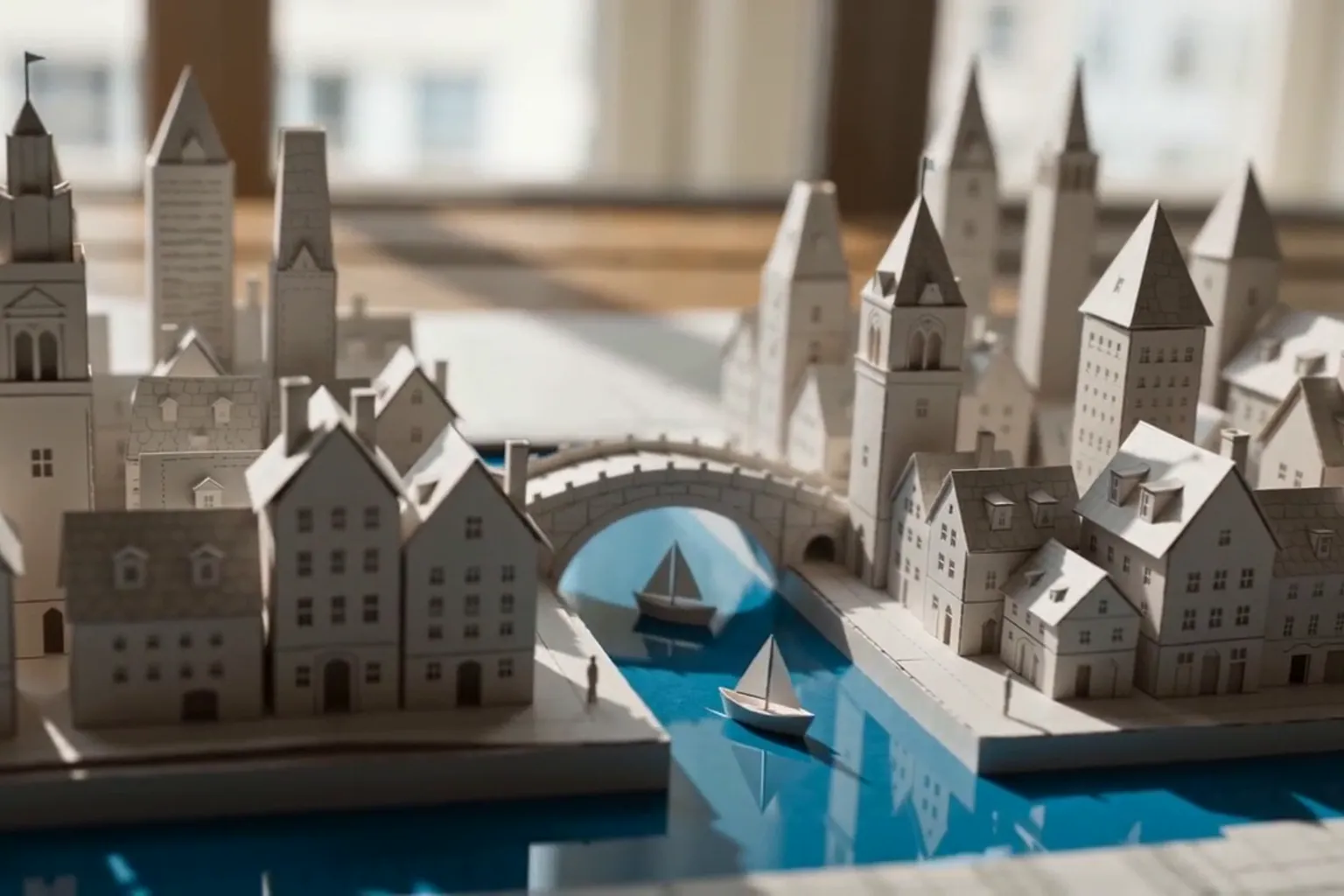
The prompt opens on a still image, a blueprint on a sunlit drafting table, then lists the transformation in visible steps: streets rise, towers stand, a bridge assembles, sailboats glide through a new canal.
The camera gets one move, from an overhead macro down to street level, timed to end as the city finishes. The style line names a craft, tactile stop-motion paper, instead of a general adjective, and the continuity line keeps the table, blueprint and city in one space.
Seedance 2.0 · 6 seconds · 720p · generated in Nsketch
Prompt
A monochrome architectural blueprint lies flat on a sunlit drafting table. Fine paper streets rise from the page and unfold into a miniature coastal city: folded towers stand upright, an arched bridge assembles itself, and tiny paper sailboats glide through a newly formed blue canal. Begin with a clean overhead macro view, then descend in one smooth crane move to street level as the city finishes unfolding. Tactile stop-motion paper craft, precise folds, soft morning shadows, subtle handmade imperfections, coherent scale, calm editorial color palette. Keep the table, blueprint and miniature city continuous. No hands, no people, no floating debris, no abrupt cuts, no text, no logo, no watermark.
What Seedance 2.0 Costs in Credits
The price depends on the version, resolution and length; sound doesn't change it. The table shows a 6-second clip, the length of the example, for runs from text or frames.
A practical loop is to test with Mini at 480p for 42 credits a run, then render the keeper with Standard: 100 credits at 720p, 330 at 1080p or 900 in 4K. At 720p, Fast costs slightly less than Mini. Runs with reference videos are priced differently, and the generator shows the total before you generate.
| 6-second clip | 480p | 720p | 1080p | 4K |
|---|---|---|---|---|
| Standard | Not offered | 100 | 330 | 900 |
| Fast | 45 | 85 | Not offered | Not offered |
| Mini | 42 | 90 | Not offered | Not offered |
When to Pick a Different Model
Pick Seedance 2.5 for anything longer than 15 seconds or a bigger reference pack. It makes up to 30 seconds and takes up to 30 images, 3 videos and 10 audio clips.
Pick Wan 3.0 for long, cheap drafts. It reaches 30 seconds at 4 credits a second at 480p.
Pick Veo 3.1 for an 8-second clip in which a character speaks a line you wrote.
The Seedance 2.0 model page lists the full specs and prompts for a 4K landscape, a named-reference scene and a first-to-last-frame shot.
FAQ
Frequently asked questions
Start with Mini or Fast at 480p while you work out the prompt and framing. Switch to Standard for the final render.
Not for Fast or Mini, which are open to everyone. Standard needs a web plan (Starter or higher), and 4K needs Pro or Max.
Use the tags in your prompt: @Image1, @Image2, @Video1, @Audio1 and so on, and give each one a job, such as the person, the location or the camera move.
No. Each generation uses either frames or references. Choose frames when the opening shot must match an image exactly.
No. It stops at 15 seconds. Seedance 2.5 renders up to 30 seconds in one take.