The joke lands because the scene stays serious. Only the car changes.
How the Tokyo Drift car swap meme works, how to put your own car in the scene with one upload, and how the template routes compare across tools.
What the Tokyo Drift Trend Is
The trend recreates a scene from The Fast and the Furious: Tokyo Drift (2006): Han leaning against his orange Mazda RX-7 outside the school, set to DJ Shadow's Six Days remix. Creators regenerate the scene with the RX-7 swapped for something else, from their own daily driver to toy cars, tractors, and rickshaws, while the staging and tone stay faithful to the original.
The format took off in mid-February 2026 after video templates of the scene appeared and a TikTok clip swapping the RX-7 for a children's Cozy Coupe spread across TikTok, X, and Reels. The absurdity does the comedic work, so the more mundane or ridiculous the vehicle, the better the video tends to perform.
Nsketch Has Two Tokyo Drift Templates
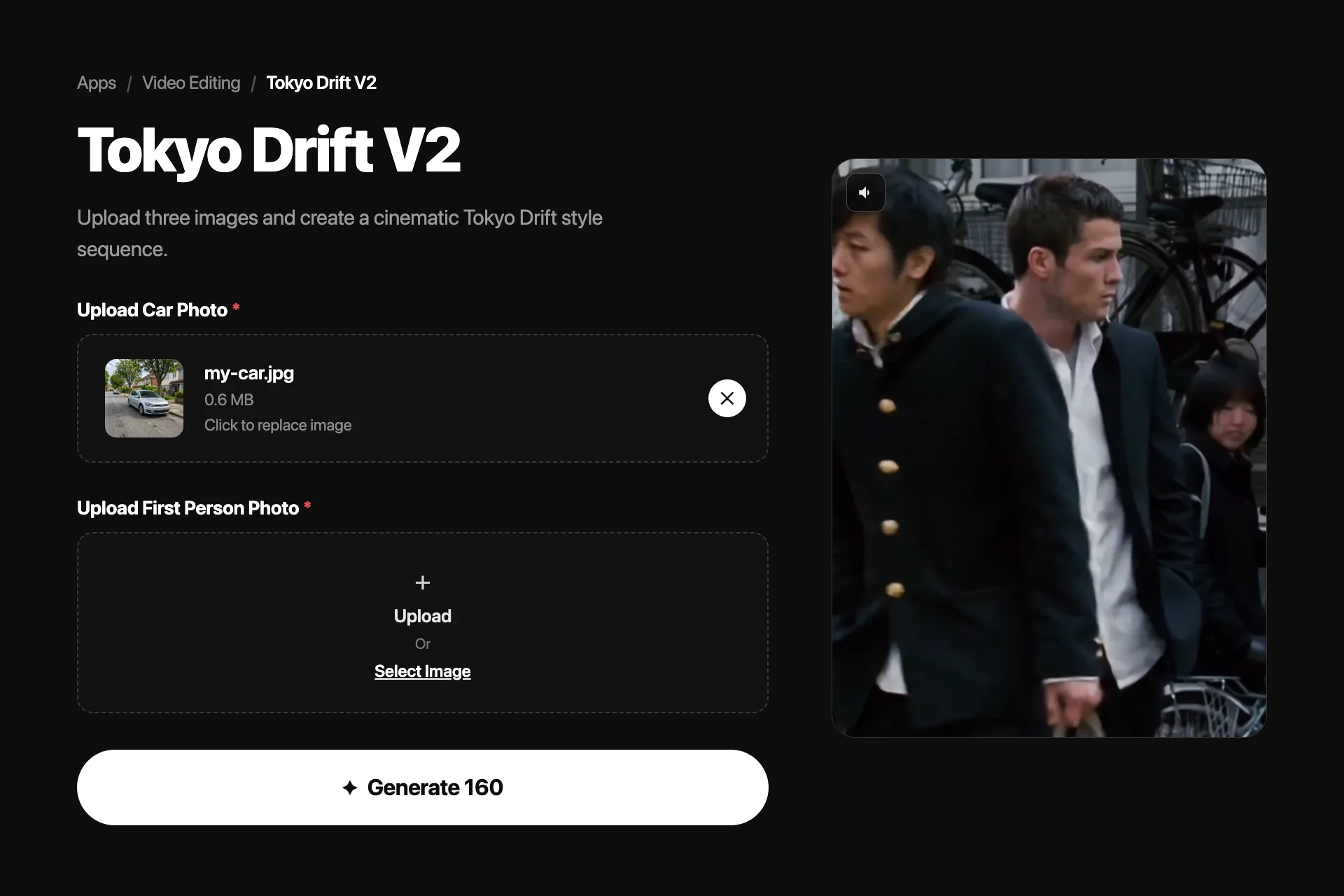
Nsketch ships two versions of the trend. Tokyo Drift V1 takes a single car photo and generates the car-only swap sequence, which is the fastest route to the classic meme. Tokyo Drift V2 takes three photos and rebuilds more of the scene: one person appears as the school student in the black uniform, your car replaces the orange car, and a second person leans against it in the final segment.
Pick V1 when the car is the joke. Pick V2 when you want yourself or friends inside the scene rather than just your vehicle.
| Tokyo Drift V1 | Tokyo Drift V2 | |
|---|---|---|
| Uploads | 1 car photo | 2 person photos + 1 car photo |
| What gets swapped | The car only | Both people and the car |
| Best for | Fast car-swap memes | Putting yourself in the scene |
Tokyo Drift V1: One Car Photo
V1 keeps the original scene intact and replaces only the featured vehicle. A clean three-quarter or side view of the car gives the template the most to work with.
Tokyo Drift V1 template · Official Nsketch template preview
Prompt
Template input: one photo of a car or other vehicle. The template replaces the orange car throughout the car-only Tokyo Drift sequence while keeping the scene's staging, lighting, and tone. No text prompt is required.
Tokyo Drift V2: Three Photos, Full Scene
V2 casts your uploads into the scene itself. The first person appears as the school student in the black uniform, the car replaces the orange car, and the second person leans against the featured car in the closing segment.
Tokyo Drift V2 template · Official Nsketch template preview
Prompt
Template inputs: a first person photo for the school student segment, a car photo that replaces the orange car, and a second person photo for the final segment leaning against the featured car. No text prompt is required.
How the Tool Routes Compare
Every popular route to this trend is template-based, because prompting a video model to rebuild the exact scene from scratch rarely holds the framing, wardrobe, and pacing that make the reference recognizable. The differences come down to how many steps sit between your photo and the finished clip.
Kling's route goes through its Explore feed: find the scene template, choose recreate, and replace the reference photo with your vehicle. Higgsfield tutorials chain two tools, an image model to swap the car into a still frame, then a video model to animate the result. Nsketch collapses this into one template pass, with the V2 option adding people, which the car-only routes do not cover.
| Route | Steps | What you upload |
|---|---|---|
| Nsketch V1 / V2 | One template pass | 1 car photo, or 2 people + car |
| Kling template | Find template, recreate, replace photo | 1 vehicle photo |
| Higgsfield workflow | Image swap, then video generation | 1 frame + 1 vehicle photo |
| Direct video prompting | Prompt, review, re-prompt | Reference frames plus a written scene brief |
Car Photos That Swap Cleanly
The template maps your vehicle onto the original car's position and angles, so the photo you upload decides how faithful the swap looks.
- Shoot a three-quarter front or clean side view rather than a head-on shot
- Keep the whole vehicle in frame with a little space around it
- Daylight photos transfer better than night shots with mixed lighting
- Absurd vehicles work: toy cars, tractors, and shopping carts read instantly
FAQ
Frequently asked questions
The Fast and the Furious: Tokyo Drift (2006). The recreated scene shows Han leaning against his orange Mazda RX-7 outside the school, with DJ Shadow's Six Days remix as the audio.
Yes. Upload one photo of your car to the Tokyo Drift V1 template and it replaces the orange car through the whole sequence. A clean three-quarter or side view works best.
V1 swaps only the car from a single photo. V2 takes three uploads and also casts two people into the scene: one as the school student and one leaning against the featured car in the final segment.
The template re-renders your vehicle at the scene's angles and lighting, so it reconstructs details the photo does not show. Photos that hide half the car, crop it, or mix strong light sources force more guessing.
The car-swap format spread in mid-February 2026, popularized by a TikTok clip that replaced the RX-7 with a children's Cozy Coupe. Variants with joke vehicles and character swaps followed across TikTok, X, and Reels.